That layout's designed for VS fighting games, especially Street Fighter series.
One of the reasons why Mega Drive controller changed their 3 buttons to 6 buttons ... to accomodate Street Fighter games because Street Fighter II was really that BIG at time!
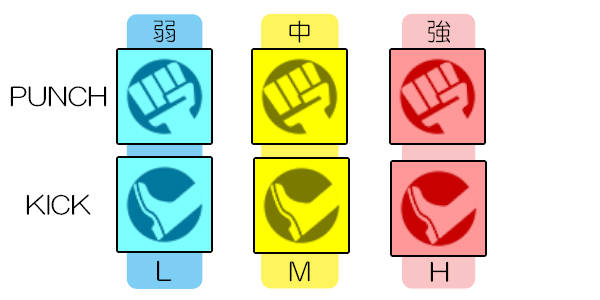
X,Y,Z : weak punch, medium punch, strong punch
A,B,C : weak kick, medium kick, strong kick
In Japan, most of Capcom fighting games sold more in Saturn than PS since their 6 button layouts captured perfectly SEGA Saturn's controller which has same layout with Mega Drive controller.
That is until SEGA Dreamcast came along and put the C and Z buttons function into L and R.
May be it's confusing for you, but for us VS fighting gamers ... this is the perfect design since it's back to its root on Arcade, Mega Drive, and Saturn.
I think the six-button controllers were a good idea, C and Z were like the secondary shoulder buttons at the time and it made the controller design stand out more compared to Nintendo's four-button controller. Granted four-buttons became the standard.
I just hope Steam Controller won't be strict to Steam and I can use it for emulators and other downloaded games.
If they want more money they won't restrict the controller to Steam only.
Also, I finally got my Steam Controller! I tested it on Sonic Adventure:
- Launching Sonic Adventure over Steam, the controller works fine as it is. But I can only play Sonic Adventure in it's clunky vanilla state with it.
- Launching the game from SAModManager, the button layout is very screwy. The "☰" button, which I asume is the start button, it closes the game down. The A button pauses the game and X button opens a keyboard menu. When I try to use the AppLauncher controller configure, it registers my XBox Adaptive Joystick and two XBox controllers.
So, I can use the controller as an input for my PC, I can use it specifically for games launched from Steam, but as far as I'm aware, it's strictly a a controller for Steam games than gaming in general.
I made a discussion post asking if I am missing an option or something, but if I can't use it for non-Steam games or emulators, then, while still a great controller and not a waste of money, I may still need to buy either a brand-new XBox One controller or wait for Retro-Bit's Dreamcast Pro Controllers.

